Docker Commands
Basic Docker Commands
- docker run < image >
docker run command is used to run a container from an image. This command will run image if it is already exists. If the image is not present on the host it will go out to docker hub and pull that image down.
- docker ps
This command list all running containers. Lists some basic information such as container id, name of the image using, current status of of the container.
- docker ps -a
This command show us outputs of all running as well as previously stopped and exited containers.
- docker stop < name of the container > or < ID of the container>
This command will stop running contaner
- docker rm < name of the container > or < ID of the container>
This command will stop container permanantly.
- docker images
This command will list available images and their sizes on our host.
- docker rmi < images >
This command will remove images. We must stop and delete all dependent containers to be able to delete an image.
- docker pull < image >
This command will only download the container image.
- docker run ubuntu —> this command will run exit immediately ubuntu image
- docker ps —> so we wont see the running of the ubuntu docker
- docker run ubuntu sleep 20 —> when container start it will sleep 20 seconds
- docker ps —> now we can see running ubuntu images along the 20 seconds.
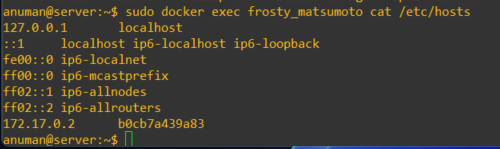
- docker exec < name of the docker > cat /etc/hosts
This command will execute cat /etc/hosts command on the contianer.
- sudo docker run -d kodekloud/simple-webapp
This command wil run docker from the backgroud. (detach)
After running this command we will see running of the container with docker ps command.
- docker attach 951a2
This command will attach the docker on the screen again.